


moving folders, subfolders, and emails from one Tbird account to another Tbird account

I have an existing Tbird account for my Gmail emails. Have set up a new Tbird account for my Outlook email account. Would like to move all emails, including folders and subfolders, to my new Outlook Tbird account (with the intent of closing my Gmail account altogether).
Would appreciate learning the steps to ensure the emails, folders, and subfolders are moved from Tbird Gmail account to Tbird Outlook account
All Replies (15)
Try this:
- click file>offline>download to ensure all messages are downloaded
- click help>troubleshootinginformation
- rightclick and scroll to 'profile folder' and click 'open folder'
- exit thunderbird
- click the the imapmail\<IMAP account folder>
- COPY all desired folders to be uploaded and store in mail\Local Folders folder
- restart thunderbird and check that all folders are functional
- highlight one folder to be uploaded, rightclick, and select COPY to the desired Outlook account. (If the folder is huge, it may be prudent to copy small groups at a time, or to create a manual filter for this. IMAP was not designed for high volume uploads.)
- after the copy, check that the online folder is complete.
- repeat the two previous steps for each desired folder.
- after all have been uploaded, you may delete the Local Folders.
Thanks much for your help. Sorry, I'm not following completely: 1. I don't see the 'File' option anywhere 2. I don't see 'Help' anywhere 5. where will I find this imapmail\<IMAP account folder> ?
Thank you
'File' is on menu bar. click alt key to show it. Help is also there, and also on the hamburger menu. after completing step 4, the imapmail folder should be visible
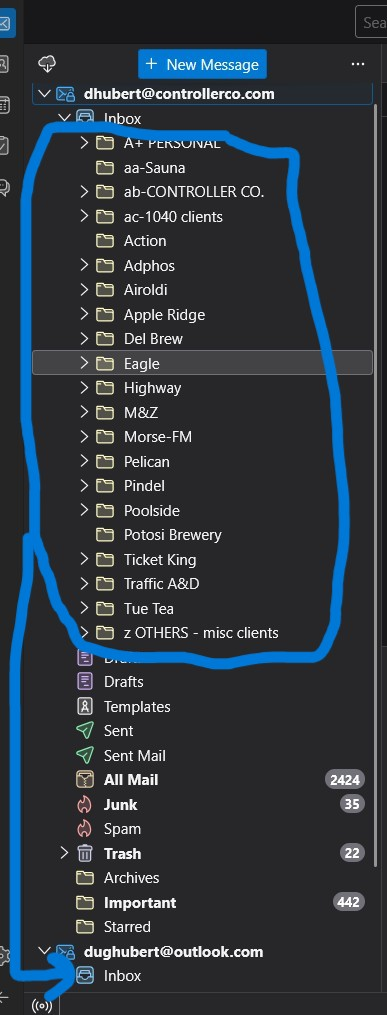
Thank you again. Ok, I am now in the midst of attempting #8; from Tbird, I copied a few of the folders from the Local Folders tree in Tbird, to fall under the Inbox of the new Outlook account in Tbird. And, while the folder names moved, the actual emails that were once within those Local Folders have been deleted somehow... maybe because Tbird went ONLINE???
(was getting notifications at bottom of Tbird screen saying 'xxx messages from FOLDERX were deleted'.)
Looks like the top half of the tree structure no longer contains the actual emails, but the bottom half still exist. Any insight?
Thanks for you help, and patience with me. I appreciate it.
Modified by dough4
I am unsure of what you're doing. the folders are now in Local Folders. - you highlight one folder, rightclick and select to 'copy to' an online folder. that folder should copy. I just redid those steps with no problems. Copy one folder at a time.
Thank you. I'm wondering why the emails that were in those Local Folders are being systematically deleted??? Tbird started at the top folder, and one by one, deleted the emails that were under those folders.
Yes, when I copy the Local Folders to the new outlook online folder, the folder copies as expected. But no emails. Maybe there's a setting where when one goes back online, Tbird deletes emails that were downloaded for offline use???
Anyway, not sure what I should be doing differently. Any thoughts?
In the interest of saving you time, I'd be happy to let you QuickAssist, or you could call me at [edited phone# from public support forum].
Thanks again
Modified by James
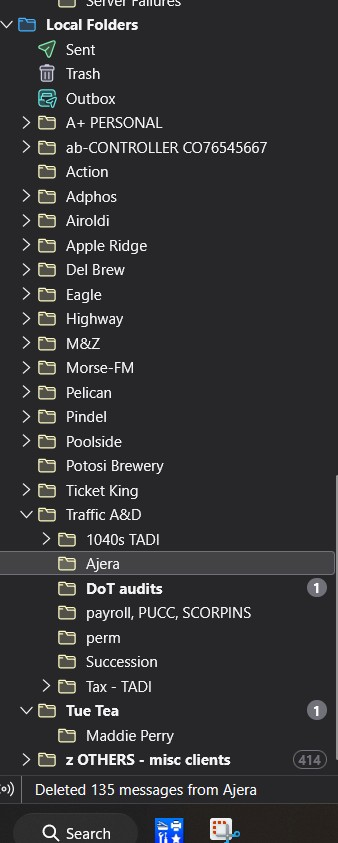
Yes, when I copy the folders from Local Folders to new Outlook account, the folder is copied, but no emails. For some reason, Tbird deleting emails systematically, one folder at a time, from top down. in case it helps, pic att'd.
Maybe there's a setting that allows to delete downloaded offline emails, once one goes back online? Or, I saw that Tbird was compacting local folders... maybe that removes emails for some reason???
Thoughts? Thanks so much
Modified by dough4
It makes me wonder if your moved the messages to Local Folders initially. Try again and, this time, first create the desired folder online. Then, highlight and copy the messages and see if that works for you. I have tested this today and am puzzled on what you may be doing and experiencing.
Thank you. So, I did everything again from the beginning, as described in your initial steps above. The same exact thing happened... all folders are there, all emails populate, then Tbird systematically deletes all emails starting from the top. So, then I re-downloaded all messages from the Offline menu, and all Local Folders were again populated with the emails, only to be systematically deleted yet again. I don't know what's driving the systematic deletions, but I'll start on other approaches, including what you described most recently.
If you have any other ideas, please let me know. Also, happy to use Quick Assist, if that interests you at all. Thanks again
Let me see if I can get another person's opinion. I know some things, but not all. :)
I might have found the answer; In Account Settings, under Local Folders, the box to 'delete messages older than 30 days' was checked. I have unchecked the box, am re-downloading via File->Offline->Download. I will let you know how that populates the Local Folders folders, and then have more hope that it will not subsequently delete the just-populated emails. Hope that helps, I'll be back in touch tonight. Thank you
Yes, that was the problem. Now that I don't have it Set to delete 30+ -day-old emails, it all worked as you had originally planned.
So, now it sounds like you're comfortable that I can now delete the Locals Folders content, and it seems I should be safe to also remove to old Gmail account (where we started the copying from). Agree?
Thanks so much for all of your help.