


Thunderbird email defaults to select the next message

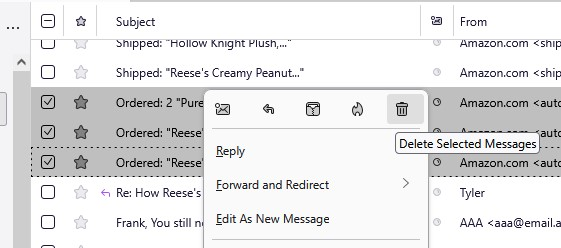
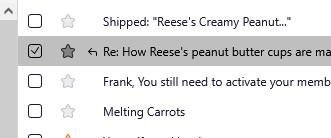
When I select emails to delete (move to Trash) Thunderbird deletes them BUT THEN automatically selects the next email in the list. If I don't notice that, and deselect it, that email gets deleted with the next batch. I've lost several emails this way. So, how do I get Thunderbird to stop selecting the next email after it deletes the ones that I selected. Nothing should be selected after an email is deleted. I don't see anything in the settings menu to do this. If this is a default feature, it's pretty dangerous and should be changed.
Gekose oplossing
Torden2, my son found an answer on Reddit that works for me. Here's the link to download the add on. Install it through the add on manager in Thunderbird settings.
https://addons.thunderbird.net/en-us/thunderbird/addon/deselect-on-delete-tb78/versions/
Sometimes (most times?) my kid knows more than I do.
Lees dié antwoord in konteks 👍 0All Replies (4)

I have the same problem. If I start on top and delete one email, sometimes the next one or even two emails are deleted, too. At first I thought something maybe was wrong with my computer, but obviously this is a bug. As you say, it can have dire consequences, if you don't notice it and go to the garbage folder and retreive the lost emails from there. Pleaser fix this!
The add on you list is nothing more than another MANUAL deselect button. There already is one that does the same thing: it's the check box at the top of the email list. The question is: How do you get Thunderbird to stop AUTOMATICALLY selecting the next email after it deletes one? Is there a way to do that?
Gekose oplossing
Torden2, my son found an answer on Reddit that works for me. Here's the link to download the add on. Install it through the add on manager in Thunderbird settings.
https://addons.thunderbird.net/en-us/thunderbird/addon/deselect-on-delete-tb78/versions/
Sometimes (most times?) my kid knows more than I do.